Library
Every game, in its right place
Overview
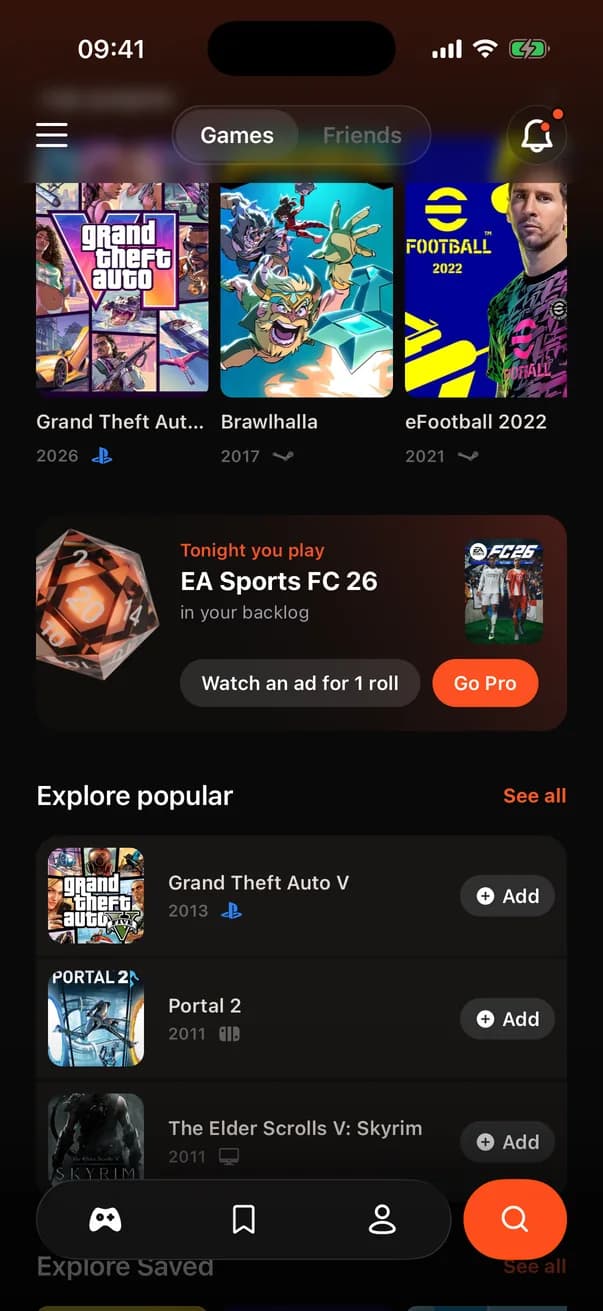
This is the screen you land on. The header carries the menu, the Prysm wordmark, the notification bell and a Games / Friends toggle, and it shrinks into a single row as you scroll. Below it: Top played, the roll card that deals tonight's game, Explore popular and up to six games you saved. A new account sees a “Fill your shelf” card with two ways in: connect Steam, or search for a game. The chevron next to Top played opens the full library in place, with tabs for All, Playing, Backlog, Completed, Paused and Saved, and a Recent or A to Z sort.
How it works
- 1
The library lives in a Zustand store that reads and writes your library entries straight to the database through the Supabase client. No backend function is involved: row-level security makes sure you only ever touch your own rows.
- 2
Every change is optimistic. Marking a game Completed, moving it to Paused or deleting it feels instant, and an error puts the old state back.
- 3
Each game has one of four statuses: Playing, Backlog, Completed or Paused. They match the four status colours the app uses everywhere, so a cover's pill means the same thing on every screen.
- 4
The free plan holds 50 games, and the database enforces the limit, not the app. When an add goes over it, the database refuses with a specific error, the app turns that into a limit error, and the paywall opens with that game waiting. Buy Pro and the game is added straight after.
- 5
Settings shows the count as “11 of 50 free games used” with a meter, and your profile shows it as a Go Pro strip. Free accounts also see one small banner ad between the roll card and Explore popular.
Key decisions
Browse in place, keep the tab bar
Opening the full library does not push a new screen. It expands inside the Games tab, so the floating tab bar stays put and one back gesture returns you to the home view. The trade-off is a longer screen component, which the team accepted to keep navigation shallow.
Top played, not recently played
An earlier design had a Recently played row. Steam does not give a reliable last-played date, so the row would have been guessing. Hours played is data the app actually has, so the home screen leads with it.
The cap lives in the database
Counting games in the app would be easy to get around with a modified client. A trigger on the library table counts instead, and it reads the subscription state that only the backend writes. Imports are exempt at import time, so a Steam library bigger than 50 still arrives whole.