Steam, Xbox, PlayStation and Android
Your backlog starts full
Overview
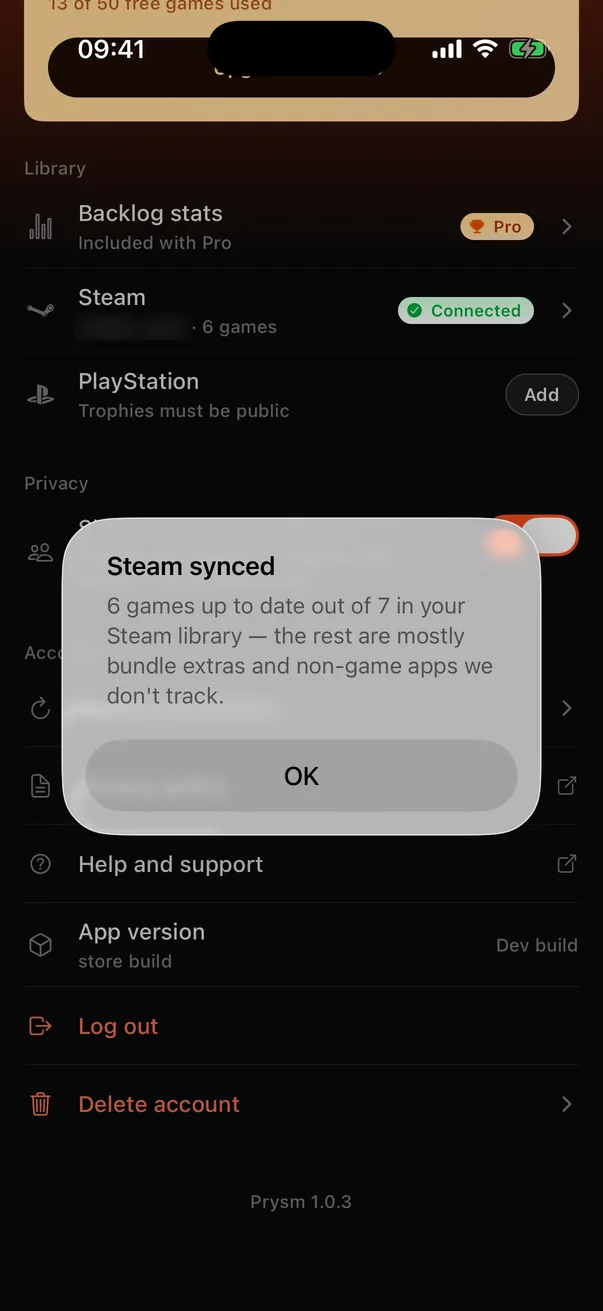
Imports are offered during onboarding and live in Settings afterwards. Steam signs you in on Steam's own page and brings your owned games with hours played. Xbox signs you in with your Microsoft account and brings the games in your title history, without hours. PlayStation has no sign-in: you type your PSN ID, and Prysm reads your public trophy list, which gives your games and trophy progress but not hours. On Android, one tap checks which games from a known list are installed on the phone. The result screen tells you plainly what happened: “Steam connected · 214 games added · Out of 380 in your Steam library”, with a line explaining that the rest are mostly bundle extras and non-game apps.
83–85%
of games you actually play land in the catalog (a real 4,652-game Steam library, 14 Sep 2026: 123 of 148 played games)
0
passwords Prysm ever sees
~490
known game packages the Android check looks for
How it works
- 1
Steam linking is three backend calls around a browser trip: start, sign in at Steam through OpenID, then return to the app through a prysm:// link and finish. The return trip is only useful together with a one-time token tied to your signed-in session, so a link made for one person cannot be redeemed by another.
- 2
The Steam import reads owned games and playtime. Steam app ids join the catalog directly, because IGDB stores them, and where the Steam app is an edition or remaster the import follows IGDB's parent link to the main game.
- 3
Xbox uses the same three-step shape, through OpenXBL. PlayStation reads the trophy list for the PSN ID you type. Your trophies need to be visible to Anyone, and the app tells you when they aren't.
- 4
On Android a small native module asks the system which of about 490 known game packages are installed. The check runs on the phone, and only the matches are sent. The app never reads or uploads your list of apps.
- 5
A private Steam profile gets a “Your Steam profile is private” screen with a button that shows how to fix it. Reconnecting never duplicates games or resets hours.
- 6
Imports finish in full, even far past the free limit. A free user whose import brought in more than 50 games sees a “Free keeps 50 games” line with a link to Pro, and nothing is taken away.
Key decisions
Talk about played games
Across everything owned, the match rate is much lower, because Steam libraries fill up with bundle extras and giveaway apps nobody opens. The app reports what it matched against the whole library, and explains the gap, rather than pretending every app id is a game.
Show the whole library before any ask
An import can bring in hundreds of games, far past the free limit, and Prysm lets it. A full shelf with your real hours on it is the value, so the limit only applies to what you add by hand afterwards. If Pro later ends, games past the 50th become read-only, never deleted.
Scan on the device
Android could have uploaded the installed-app list and matched it on the server. Checking a fixed list of known packages on the phone means nothing but the matches ever leaves it, which is also what the privacy policy promises.
No Nintendo
Nintendo has no owned-games API, so there is nothing to import. The app says so rather than offering a button that cannot work.
The research behind it
Decisions on this page that rest on RevenueCat's published data and guides.
Value before the ask
RevenueCat's guide on turning freemium users into subscribers argues for letting people reach the full value of the free product before asking them to pay. For a backlog tracker the value is a full shelf, which is why imports are exempt from the cap.
How to turn freemium users into loyal subscribers