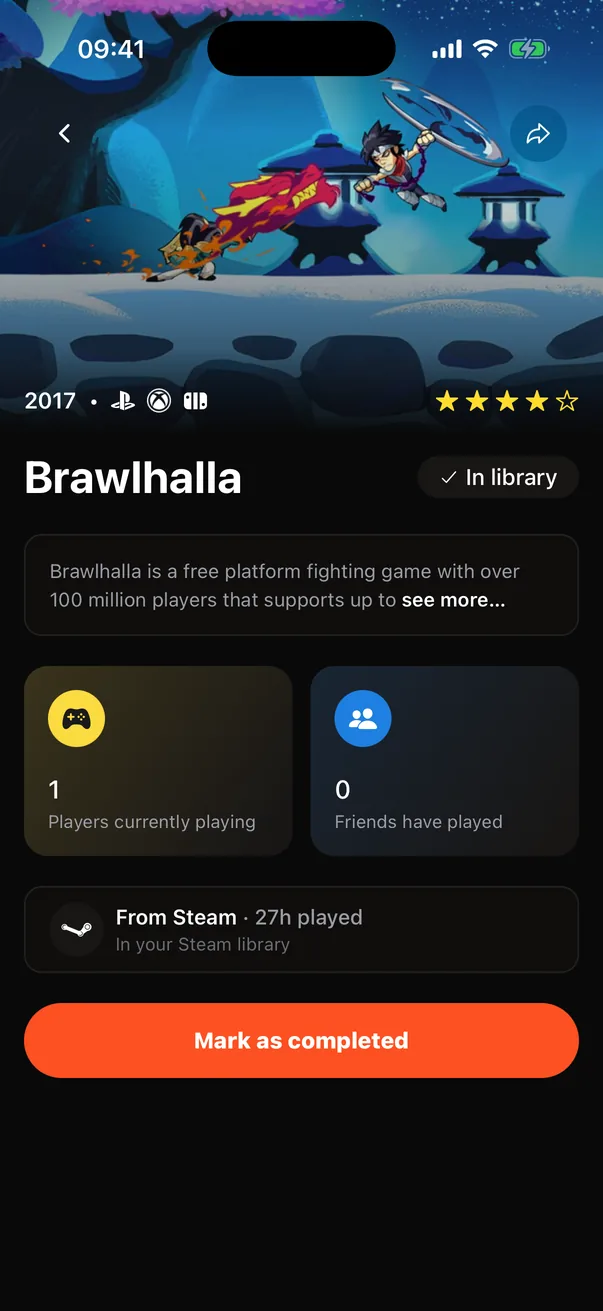
Game page
Everything about one game
Overview
Tap any game and you get a hero image with the release year (or TBA), platform icons and a star rating, with glass back and share buttons on top. Below: the title with a Save button, the summary (tap see more to expand it), and two tiles, “Players currently playing” and “Friends have played”. Then a Posts row with what people wrote about the game. Once the game is in your library you also see where you found it (the Saved from card), PC requirements, and a Mark as completed button. Completing a game opens a sheet for a rating out of 10, the hours it took and a review, which you can post to your feed or skip. Upcoming games get a Watch for release button, and games you have not saved can go on your wishlist.
How it works
- 1
Game data comes from the catalog through a backend function that returns one consistent game object, whichever route produced it. Wide art comes from a separate artwork function, with a blurred cover as the fallback.
- 2
The stars are IGDB's critic score, shown to the nearest half star.
- 3
The two player tiles and the posts row are database functions: how many people are playing the game, how many of the people you follow have played it, and the ten latest posts that attach it.
- 4
Mark as completed sets the status and the finish date together; a database trigger keeps the two in step. The review button opens the post composer with the Reviews category already set.
- 5
Watch for release adds a watch, which the release-day sweep and the local reminder both read. Free accounts see a small banner below the player tiles.
Key decisions
One game shape everywhere
Search, popular lists, roulette and the game page all return the same object: identity, cover, release date with its precision, genres, platforms, critic score, time to beat with its number of submissions, session fit and summary. The app renders a game the same way whichever screen it came from.
The page is about the game
Status, rating, hours and notes live in your library and the completed sheet, not on the game page. The page stays a clean description of the game and what people think of it.
Ad after the content
The banner sits below the game's own information and the player tiles, never above the fold. You see what you came for first.